Objects
Replace phones, cups, books, tools, food, electronics, or other everyday items.
See something you want to change? Replace it.
XPT's AI Image Replacer lets you swap objects, clothes, props, accessories, and other details with simple text prompts.
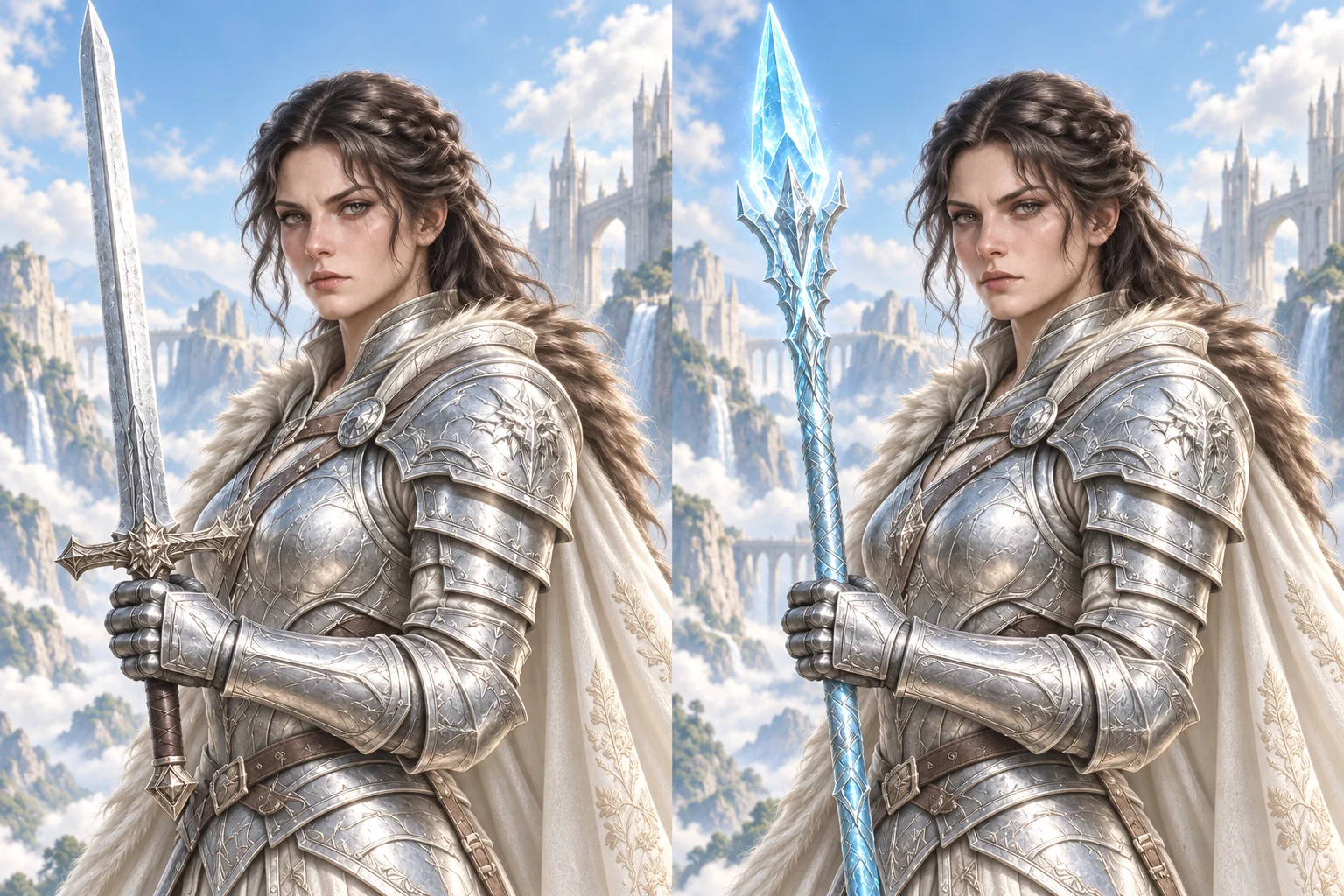
You have an image you like.
The character looks right.
The composition works.
The details are almost perfect.
Except for one thing.
Maybe the character is holding the wrong object. Maybe an accessory does not fit. Maybe you want to see how the same image looks with something completely different.
You do not need to generate everything again.
Tell XPT what you want to replace and what should take its place.
Keep the image you already like and change only what matters.
From everyday objects to fictional props, XPT gives you more freedom to swap different elements inside an image.
Replace phones, cups, books, tools, food, electronics, or other everyday items.
Swap items held or used by characters without rebuilding the whole scene.
Try different glasses, hats, jewelry, bags, masks, headphones, or character accessories.
Replace jackets, shirts, dresses, costumes, armor, and other clothing.
Swap chairs, tables, lamps, decorations, and other objects inside a room.
Replace ordinary objects with magical artifacts, futuristic devices, fantasy weapons, or your own fictional ideas.
Choose an image with the object or detail you want to replace.
Tell XPT what should be replaced and what you want to see instead.
Try another prompt to explore a different result.
The goal is simple:
Change the selected idea without losing the image you already like.
For example:
Original:
A fantasy warrior holding a normal sword.
Replace:
“Replace the sword with a glowing crystal spear. Keep the character, armor, pose, and background the same.”
Or:
Original:
An anime character carrying a black backpack.
Replace:
“Replace the black backpack with a brown leather adventurer bag. Keep everything else unchanged.”
Or:
Original:
A character sitting in a gothic room.
Replace:
“Replace the modern chair with an ornate black throne. Keep the character and room unchanged.”
One prompt. One replacement. A new version of the same image.

Replacement does not have to be practical.
It can be part of the creative process.
Turn a normal umbrella into a glowing energy shield.
Replace a coffee cup with a mysterious potion.
Swap a smartphone for a futuristic communication device.
Turn an ordinary necklace into an ancient magical artifact.
Replace a backpack with adventurer gear.
Your replacement does not need to exist in the real world.
Describe it and see where the idea goes.
Focus on the element you want to change instead of creating another image from scratch.
Keep the subject, pose, layout, and other details as close to the original as possible.
Explore unusual objects, fantasy items, costumes, props, and creative concepts with fewer unnecessary restrictions.
Tell XPT what should go and what should replace it. No complex editing work is needed.
Try replacing the same part with different ideas and compare the results.
Go beyond realistic replacements and experiment with fictional, surreal, fantasy, or futuristic ideas.
The same image can tell different stories depending on what you replace.
Before: A girl holding a book.
After: A girl holding a glowing spellbook.
A simple portrait becomes part of a fantasy world.
Before: A character wearing normal headphones.
After: A character wearing a futuristic neural headset.
The character stays the same. The idea changes.
Before: A character carrying a school backpack.
After: A character carrying a leather explorer pack with maps and tools.
Replacing one object can completely change the story.
Before: A person holding an umbrella.
After: A person holding a transparent energy shield.
Sometimes the most interesting replacement is the one that should not exist.
Small objects can say a lot about a character.
A weapon can show what kind of fighter they are.
A bag can suggest where they are going.
Jewelry can hint at their history.
A magical object can become part of their story.
Instead of redesigning the whole character, replace individual items and see how the character changes.
Try different:
Keep the character.
Experiment with the details.
Not sure how it works?
Try several options.
For example, start with a character holding a sword.
Replace it with:
“A large medieval battle axe.”
Then:
“A thin glowing blue energy blade.”
Then:
“An ancient golden staff covered in runes.”
Then:
“A broken crystal sword with purple light coming from the cracks.”
You can keep the same image and test different ideas around it.
This makes object replacement useful for concept development, character design, and visual experimentation.
You do not need a complicated prompt.
A useful structure is:
Replace [current object] with [new object]. Keep [important elements] unchanged.
For example:
“Replace the red handbag with a small black leather backpack. Keep the person and background unchanged.”
Or:
“Replace the wooden sword with a silver fantasy sword covered in blue runes. Keep the character unchanged.”
Or:
“Replace the lamp on the desk with a glowing crystal. Keep the room and lighting the same.”
Want another version?
Change the replacement and generate again.
An AI Image Replacer helps you replace an object in an image with a simple prompt.
Upload your image, describe the object you want to replace, and tell XPT what should appear instead.
Yes. Tell XPT what you want to replace, and it will keep the rest of the image as close to the original as possible.
You can replace everyday objects, props, accessories, furniture, clothing, decorations, fantasy items, and other visual elements.
Yes. Replace any object with something new, such as a fantasy item, futuristic device, or fictional object.
Yes. You can replace individual clothing items or outfits. For more clothing-focused changes, describe the exact garment and style you want.
Yes. Start with an AI-generated image and replace specific objects or details without creating the whole image again.
Yes. Keep the same image and test different objects, styles, colors, materials, or ideas.
No. Describe what you want to replace using natural language.
Do not restart an image because one detail feels wrong. Replace the object, try a different idea, and keep everything you already like.
Replace Anything with XPT