XPT-Journal / Bewertungen & Alternativen

XPT vs. Gemini: kreative Freiheit oder Google-Integration?

XPT
·22. August 2026·16 Min. Lesezeit
Teilen

Die kürzeste Antwort lautet: Wähle XPT, wenn die Arbeit selbst bestimmen soll, wohin sich das Gespräch entwickelt; wähle Gemini, wenn die Arbeit durch Googles weitreichenderes Ökosystem laufen muss.

Beide Plattformen können brainstormen, schreiben, recherchieren, Dateien interpretieren und Bilder erstellen. Der Vorteil von Gemini ist die Infrastruktur: langer Kontext, Deep Research, Canvas, Google-Apps, Speicher sowie eine wachsende Zahl verknüpfter Dienste. Der Vorteil von XPT ist die kreative Bandbreite: ein fokussierter Raum für die Entwicklung von Text und Visuals mit weniger unnötigen Unterbrechungen – plus Zugriff auf ausgewählte Modelle statt auf die Modellfamilie eines einzelnen Anbieters.

Dieser Unterschied ist wichtiger als eine generische Feature-Checkliste. Um zu sehen, warum, verfolge ein kreatives Projekt vom ersten Gedanken bis zum finalen Asset.

Starte mit dem Ziel

Wenn dein fertiges Projekt so aussieht … Der stärkere Ausgangspunkt
Eine Geschichte, eine Figur, eine visuelle Welt oder eine offenere Idee, die sich beim Erkunden verändert XPT
Ein Bericht, der aus vielen Dateien, Webquellen, Gmail, Drive, Kalender oder anderen verbundenen Diensten zusammengestellt ist Gemini
Ein Text-und-Bild-Projekt, bei dem kreative Dynamik mehr zählt als die Integration in ein Ökosystem XPT
Ein Workflow, der in Docs, Gmail, Canvas, NotebookLM, Flow oder Google-Speicher weiterlaufen soll Gemini
Ein privater Entwurf, bei dem du nicht möchtest, dass XPT das Gespräch behält XPT Incognito
Eine temporäre Google-Sitzung, die nicht zum Trainieren seiner KI-Modelle genutzt werden soll Gemini Temporary Chat

XPT ist die fokussiertere Wahl für offene Text- und Bildkreation; Gemini ist die besser vernetzte Wahl für Recherche und produktivitätsorientierte Workflows, die auf Google basieren.

Die letzten beiden Optionen klingen ähnlich, sind aber nicht identisch. Ihre Details zur Speicherung unterscheiden sich – darauf kommen wir gleich zurück.
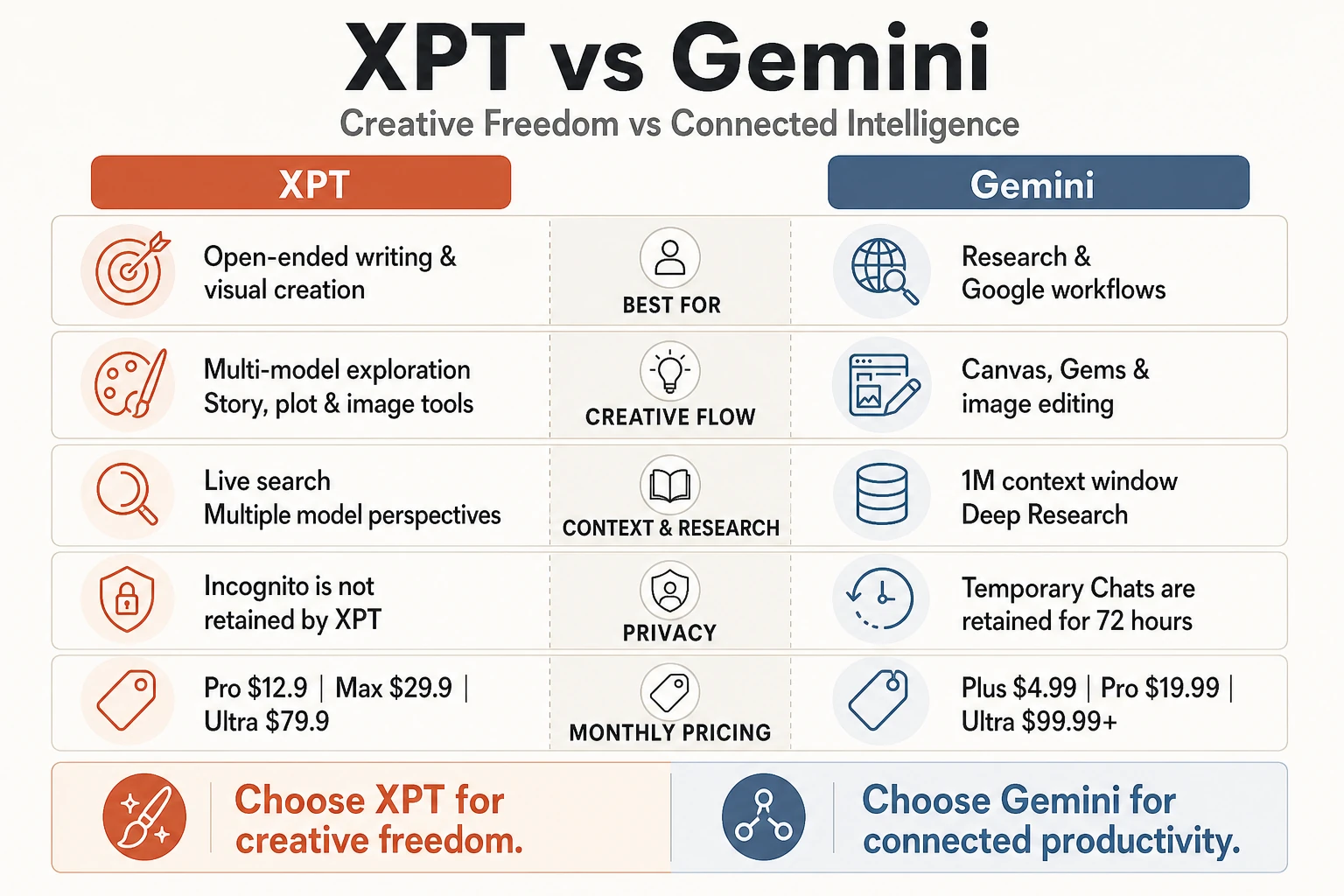
xpt-vs-gemini-differences

Ein Projekt, fünf Momente

Stell dir vor, du entwickelst ein illustriertes Konzept für spekulative Fiktion. Du hast eine grobe Prämisse, Hintergrundrecherche, mehrere Notizen zu Figuren und eine visuelle Richtung – aber keine fertige Gliederung. Genau hier fangen die beiden Produkte an, sich spürbar zu unterscheiden.

Moment 1: Die Idee ist noch nicht stabil

Frühe kreative Arbeit profitiert davon, genügend Raum zu haben, sich auch selbst zu widersprechen. Du kannst nach fünf Richtungen fragen, vier verwerfen, die zentrale Beziehung ändern und den Ton mitten im Gespräch umschreiben.

XPT ist für diese explorative Phase ausgelegt. Sein Wert ist nicht nur, einfach noch einen weiteren Absatz zu produzieren; es geht darum, dass eine legitime kreative Richtung weiterwachsen darf, ohne dass du sie in eine sicherere, generischere Version drücken musst. Eine grobe Prämisse kann über den AI Character Description Generator zu einem Figurenprofil werden – und dann über den AI Plot Generator in unterschiedliche Erzählstrukturen verzweigen.

Gemini kann ebenfalls brainstormen und entwerfen, und die aktuellen Flash- und Pro-Modelle bieten unterschiedliche Abwägungen zwischen Geschwindigkeit und Begründung. Es wird meist besonders überzeugend, wenn die Aufgabenstellung bereits mit einem konkreten Ziel verbunden ist: diese Quellmaterialien organisieren, diese Dokumente vergleichen, einen Forschungsplan aufstellen oder einen Entwurf in ein strukturiertes Arbeitspapier verwandeln.

Kreativer Vorteil: XPT. Vorteil bei der Aufgabenorganisation: Gemini.

Moment 2: Das Projekt wird größer als ein einzelner Prompt

Gemini hat eine klare Stärke, wenn im Projekt eine große Menge an Referenzmaterial steckt. Auf der aktuellen Limits-Seite von Google wird ein 1-Million-Token-Kontextfenster für Google AI Pro und Ultra genannt – im Vergleich zu 32.000 Token ohne Plan und 128.000 Token mit AI Plus. Google beschreibt das größere Fenster als ausreichend für ungefähr 1.500 Seiten Text, obwohl die praktische Leistung weiterhin vom jeweiligen Auftrag und der Dokumentstruktur abhängt.

Das macht Gemini attraktiv, um ein langes Manuskript zu lesen, Recherche-Dateien über Querverweise hinweg zu vergleichen oder Details zu finden, die in vielen Dokumenten verstreut sind. Deep Research kann zudem Webquellen durchsuchen und synthetisieren, während Gems benutzerdefinierte Anweisungen und Referenzdateien für eine wiederkehrende Rolle bewahren können.

XPT geht mit der Breite anders um. Anstatt den Workflow auf die Modellfamilie eines einzelnen Anbieters und verknüpfte Services zu zentrieren, lässt es Nutzer je nach Plan auf ausgewählte Modelle mehrerer Anbieter zugreifen. Das ist praktisch, wenn du eine zweite kreative Interpretation, eine andere Stimme oder eine weitere Art haben willst, dieselbe Idee weiterzuentwickeln, ohne das komplette Projekt in ein separates Produkt zu verlagern.

Gemini gewinnt bei der Größe und Integration des Arbeitskontexts. XPT gewinnt, wenn „mehr Perspektive“ wichtiger ist als „mehr Material in einem einzigen Kontextfenster“.

Moment 3: Worte müssen zu Bildern werden

Gemini ist nicht mehr nur ein Text-Assistent mit einer einfachen Bild-Schaltfläche. Die aktuellen Bild-Tools von Google unterstützen Generierung und dialogorientiertes Bearbeiten über die Nano-Banana-Modellfamilie. Google betont referenzbasiertes Bearbeiten, Konsistenz der Figuren, Bild-Mixing und die Möglichkeit, ausgewählte Details mit Folgeanweisungen zu ändern. Bezahlte Pläne bieten außerdem höheren Zugriff auf Bildfunktionen, während Flow das Ökosystem in die Erstellung cineastischer Szenen erweitert.

Damit ist Gemini eine ernsthafte Option, wenn visuelle Arbeit präzises iteratives Editing braucht oder in andere Google-Kreativtools hinein weitergehen soll.

Der visuelle Vorteil von XPT liegt in der Kontinuität mit dem Schreibprozess. Du kannst in einem Gespräch die Vorgeschichte, das Aussehen, den Schauplatz, die Stimmung und die Farbpalette einer Figur entwickeln – und anschließend in die Bildgenerierung wechseln, ohne den visuellen Prompt als separaten Produktionsauftrag zu behandeln. Der AI Fantasy Art Generator bietet einen direkten Weg von einer geschriebenen Idee zu phantasievollen Figuren, Umgebungen und cineastischen Szenen.

Der Unterschied ist subtil, aber nützlich:

  • Gemini bietet ein stärker entwickeltes Bildbearbeitungs- und vernetztes Media-Ökosystem.
  • XPT hält die visuelle Kreation nah am ursprünglichen Story-, Figuren- oder Ideenkern.

Wenn das präzise Bearbeiten von Assets die Aufgabe ist, hat Gemini das stärkere Toolset. Wenn das Bild Teil einer sich entwickelnden kreativen Unterhaltung ist, bietet XPT die klarere Route.

Moment 4: Der Entwurf braucht einen Platz zum Weitergehen

Der größte Vorteil von Gemini zeigt sich erst, nachdem die Antwort generiert wurde. Canvas bietet einen gemeinsamen Raum zum Schreiben, Bearbeiten und Präsentieren eines Arbeitendokuments. Gemini kann mit Google-Apps und -Services wie Gmail, Drive, Kalender, Tasks, Fotos und YouTube verbunden werden – sofern die Funktion, das Konto, die Sprache und das Land unterstützt werden. Google-AI-Abonnements können außerdem Speicher, NotebookLM-Zugriff, Flow-Credits sowie Gemini direkt innerhalb von Workspace-Apps bündeln.

Für Menschen, die bereits im Google-Ökosystem arbeiten, kann das mehrere Übergaben vermeiden. Recherche kann zu einem Entwurf werden; ein Entwurf kann in Docs weitergehen; Informationen lassen sich aus Drive oder Gmail ziehen; und dasselbe Abonnement kann sowohl Speicher als auch zusätzliche KI-Services abdecken.

XPT ist bewusst fokussierter. Sein Wert ist am höchsten vor dieser operativen Übergabe: eine Idee erkunden, sie ausarbeiten, überarbeiten, Figuren und Plots aufbauen und das Ergebnis in Bilder übersetzen. Der AI Story Generator hilft, von der Prämisse zu Szenen zu gelangen, während der AI Novel Generator die längere Entwicklung der Erzählung unterstützt.

Das ist kein Wettbewerb um fehlende Features. Gemini ist besser darin, kreative Arbeit mit einem Produktivitäts-Ökosystem zu verbinden. XPT ist besser darin, die kreative Unterhaltung selbst offen und zentral zu halten.

Moment 5: Unfertige Arbeit bleibt privat

XPT bietet zwei klar unterschiedliche Modi. Im Personal-Modus werden verschlüsselte Verlaufshistorien und Anhänge gespeichert, damit du zu einem Projekt zurückkehren kannst. Laut XPT-Datenschutzrichtlinie werden Incognito-Gespräche nicht in der XPT-Datenbank, auf dem Datenträger oder in Backups gespeichert. Wenn du ein Modell eines Drittanbieters auswählst, gelten dessen Verarbeitungskonditionen trotzdem – denn der Prompt muss an diesen Anbieter gesendet werden.

Gemini verfügt über ein Privacy Hub: Temporary Chats werden nicht in den zuletzt verwendeten Chats angezeigt, nicht genutzt, um das Erlebnis zu personalisieren, und nicht verwendet, um Googles KI-Modelle zu trainieren. Google speichert Temporary Chats jedoch weiterhin mit dem Konto für 72 Stunden, um den Dienst bereitzustellen und Google sowie seine Nutzer zu schützen. Wenn Keep Activity aktiv ist, folgt die Chat-Aktivität der Aufbewahrungseinstellung des Kontos; Inhalte, die von menschlichen Prüfern ausgewertet werden, können separat für bis zu drei Jahre gespeichert werden.

Wähle XPT Incognito, wenn die Priorität bei der Nicht-Aufbewahrung durch XPT liegt. Wähle Gemini Temporary Chat, wenn du eine Sitzung außerhalb des normalen Verlaufs und des Modelltrainings möchtest – dabei aber innerhalb des Google-Services und des 72-Stunden-Aufbewahrungsrahmens bleiben willst.

Keine der beiden Optionen ist dafür geeignet, Passwörter, Zahlungsdaten, regulierte personenbezogene Informationen, vertrauliche Kundendateien oder Material hochzuladen, das du nicht autorisiert bist zu teilen.

Zwei Gemini-Komfortabzüge, die Creator zuerst testen sollten

Erstens ist die Verhaltenskonsistenz über Modell-Updates hinweg. In einer aktuellen Reddit-Diskussion über Creative-Writing-Modelle

{{"title":"XPT vs Gemini: Creative Freedom or Google Integration?","cover_alt":"xpt-vs-gemini","draft_markdown":"The shortest answer is this: choose XPT when the work itself should determine where the conversation goes; choose Gemini when the work needs to move through Google’s wider ecosystem.\n\nBoth platforms can brainstorm, write, research, interpret files, and create images. Gemini’s advantage is infrastructure: long context, Deep Research, Canvas, Google apps, storage, and a growing set of connected services. XPT’s advantage is creative latitude: a focused space for developing text and visuals with fewer unnecessary interruptions, plus access to selected models rather than one provider’s model family.\n\nThat distinction matters more than a generic feature checklist. To see why, follow one creative project from the first idea to the final asset.\n\n## Start with the Destination\n\n| If your finished project looks like this… | The stronger starting point |\n| --- | --- |\n| A story, character, visual world, or open-ended concept that will change as you explore it | XPT |\n| A report assembled from many files, web sources, Gmail, Drive, Calendar, or other connected services | Gemini |\n| A text-and-image project where creative momentum matters more than ecosystem integration | XPT |\n| A workflow that should continue into Docs, Gmail, Canvas, NotebookLM, Flow, or Google storage | Gemini |\n| A private draft where you do not want XPT to retain the conversation | XPT Incognito |\n| A temporary Google session that should not be used to train its AI models | Gemini Temporary Chat |\n\nXPT is the more focused choice for open-ended text and image creation; Gemini is the more connected choice for research and Google-based productivity workflows.\n\nThe last two options sound similar but are not identical. Their retention details differ, which we will return to below.\n\n

xpt-vs-gemini-differences
\n\n## One Project, Five Moments\n\nImagine you are developing an illustrated speculative-fiction concept. You have a loose premise, background research, several character notes, and a visual direction—but no finished outline. Here is where the two products begin to feel different.\n\n### Moment 1: The idea is still unstable\n\nEarly creative work benefits from room to contradict yourself. You may ask for five directions, discard four, change the central relationship, and rewrite the tone halfway through the conversation.\n\nXPT is designed for this exploratory phase. Its value is not merely producing another paragraph; it is allowing a legitimate creative direction to keep developing without forcing it into a safer, more generic version. A rough premise can become a character profile through the AI Character Description Generator, then branch into different narrative structures through the AI Plot Generator.\n\nGemini is also capable of brainstorming and drafting, and its current Flash and Pro models provide different balances of speed and reasoning. It tends to become more compelling when the brief is already connected to a concrete task: organize this source material, compare these documents, build a research plan, or turn a draft into a structured working document.\n\nCreative advantage: XPT. Task-organization advantage: Gemini.\n\n### Moment 2: The project becomes larger than one prompt\n\nGemini has a clear strength when the project contains a large amount of reference material. Google’s current limits page lists a 1 million-token context window for Google AI Pro and Ultra, compared with 32,000 tokens without a plan and 128,000 with AI Plus. Google describes the larger window as sufficient for up to roughly 1,500 pages of text, although practical performance still depends on the task and document structure.\n\nThat makes Gemini attractive for reading a long manuscript, cross-referencing research files, or finding details scattered across many documents. Deep Research can also search and synthesize web sources, while Gems can preserve custom instructions and reference files for a repeated role.\n\nXPT approaches breadth differently. Rather than centering the workflow on one provider’s model family and connected services, it lets users access selected models from multiple providers, depending on the plan. That is useful when you want a second creative interpretation, a different voice, or another way of developing the same idea without moving the entire project into a separate product.\n\nGemini wins on the size and integration of the working context. XPT wins when “more perspective” matters more than “more material in one context window.”\n\n### Moment 3: Words need to become images\n\nGemini is no longer just a text assistant with a basic image button. Google’s current image tools support generation and conversational editing through the Nano Banana model family. Google highlights reference-based editing, character consistency, image blending, and the ability to change selected details with follow-up instructions. Paid plans also provide higher access to image features, while Flow extends the ecosystem into cinematic scene creation.\n\nThat makes Gemini a serious option when visual work needs precise iterative editing or will continue into other Google creative tools.\n\nXPT’s visual advantage is continuity with the writing process. You can develop a character’s history, appearance, setting, mood, and color palette in conversation, then move into image generation without treating the visual prompt as a separate production brief. The AI Fantasy Art Generator provides a direct route from a written concept to imaginative characters, environments, and cinematic scenes.\n\nThe distinction is subtle but useful:\n\n- Gemini offers a more developed image-editing and connected-media ecosystem.\n- XPT keeps visual creation close to the original story, character, or idea.\n\nIf precise asset editing is the job, Gemini has the stronger toolset. If the image is part of an evolving creative conversation, XPT offers the cleaner path.\n\n### Moment 4: The draft needs somewhere to go\n\nGemini’s biggest advantage appears after the answer is generated. Canvas provides a shared space for writing, editing, and presenting a working document. Gemini can connect with Google apps and services such as Gmail, Drive, Calendar, Tasks, Photos, and YouTube where the feature, account, language, and country are supported. Google AI subscriptions can also bundle storage, NotebookLM access, Flow credits, and Gemini inside Workspace apps.\n\nFor someone already working inside Google’s ecosystem, this can remove several handoffs. Research can become a draft; a draft can move into Docs; information can be pulled from Drive or Gmail; and the same subscription may cover storage and additional AI services.\n\nXPT is deliberately more focused. Its value is highest before that operational handoff: exploring an idea, writing it, revising it, building characters and plots, and translating the result into images. The AI Story Generator helps move from premise to scenes, while the AI Novel Generator supports longer narrative development.\n\nThis is not a missing-feature contest. Gemini is better at connecting creative work to a productivity ecosystem. XPT is better at keeping the creative conversation itself open and central.\n\n### Moment 5: The unfinished work is private\n\nXPT offers two distinct modes. Personal mode saves encrypted conversation history and attachments so you can return to a project. According to the XPT privacy policy, Incognito conversations are not stored in XPT’s database, on disk, or in backups. If you select a third-party model, its processing terms still matter because the prompt must be sent to that provider.\n\nGemini’s Privacy Hub says Temporary Chats do not appear in recent chats, are not used to personalize the experience, and are not used to train Google’s AI models. Google still retains Temporary Chats with the account for 72 hours to provide the service and protect Google and its users. When Keep Activity is on, chat activity follows the account’s retention setting; content reviewed by human reviewers may be retained separately for up to three years.\n\nChoose XPT Incognito when non-retention by XPT is the priority. Choose Gemini Temporary Chat when you want a session outside normal history and model training while remaining inside Google’s service and 72-hour retention framework.\n\nNeither option makes it appropriate to upload passwords, payment data, regulated personal information, confidential client files, or material you are not authorized to share.\n\n## Two Gemini Trade-offs Creators Should Test First\n\nThe first is behavior consistency across model updates. In a recent Reddit discussion about creative-writing models, users disagreed sharply about Gemini 3.1 Pro: one criticized prompt adherence and repetitive phrasing, while another considered it the strongest option. The disagreement is more useful than either verdict. It suggests that writers should test Gemini with their own voice, scene structure, and revision instructions instead of relying on a universal ranking.\n\nThe second is predictability of limits. Google now describes usage as compute-based: prompt complexity, selected model, feature, and conversation length can affect consumption, with five-hour and weekly limits. The official limits page also says limits may change because of testing, availability, or capacity. This system allows Google to allocate expensive capabilities more dynamically, but it is less concrete than a simple fixed message count.\n\nThese are not reasons to dismiss Gemini. They are the two things a serious creator should verify during the free tier or first billing period: does the current model preserve your voice, and do the current limits match the way you actually work?\n\n## Pricing Changes the Calculation\n\nCurrent advertised monthly prices are:\n\n| XPT | Price | Google AI | Price |\n| --- | --- | --- | --- |\n| Pro | $12.9/month | AI Plus | $4.99/month |\n| Max | $29.9/month | AI Pro | $19.99/month |\n| Ultra | $79.9/month | AI Ultra | From $99.99/month |\n\nGoogle’s current subscription page also lists a higher AI Ultra option at $199.99 per month with greater usage limits. Prices, features, eligibility, and storage bundles vary by region and may change.\n\nThe $4.99 AI Plus tier gives Gemini a lower paid entry point. Google AI Pro becomes compelling when the 1M context window, Google integrations, Flow credits, NotebookLM, and bundled storage replace services you would otherwise buy separately. AI Ultra is aimed at users who need substantially higher limits and early access to advanced features.\n\nXPT’s pricing is easier to justify when the subscription is primarily for open-ended text and image creation. Pro costs less than Google AI Pro; Max remains well below Google AI Ultra; and Ultra provides XPT’s highest tier at $79.9 per month. The plans are not direct feature equivalents, so compare the workflow you will use—not just the tier names.\n\n## The Final Decision\n\nChoose Gemini if your creative work is inseparable from Google’s research, files, apps, storage, and media ecosystem. Its long context, Deep Research, Canvas, connected apps, image editing, and subscription bundles can turn many separate tasks into one connected workflow.\n\nChoose XPT if you want a more focused environment where ideas can evolve freely across writing and images, with access to selected models and less pressure to fit the work into one provider’s ecosystem. It is the better match for creators who value exploration and continuity over integrations.\n\nIf you are still deciding among the major assistants, XPT vs ChatGPT examines the broadest general-purpose ecosystem, while XPT vs Claude focuses more closely on prose, revision, and creative control. For a privacy-first multi-model studio, see XPT vs Venice.