アニメ風の編集は、ポートレート写真、ペットの写真、旅行の風景、日常のワンシーンを、洗練されたイラストに変えてくれます。最も効果的なのは、被写体の見た目を認識できるままに保ちながら、線のタッチ、カラーパレット、陰影、そして雰囲気を変えることです。
まずははっきりした元画像から始め、何を同じにするかを決めましょう。顔、髪型、服装、ポーズ、背景、構図のどれを維持するかです。
アニメの方向性を選ぶ
アニメは、静かな水彩のようなシーンから、大胆なアクションアートまで幅広くあります。生成する前に、ビジュアルの方向性を定義してください。
| Direction | Visual Cues |
|---|---|
| Soft slice-of-life | 優しい光、クリンな線、温かい色 |
| Cinematic fantasy | 劇的な空、細部まで描き込んだ風景、豊かな色 |
| Modern action | 強い線描、よりシャープなコントラスト、ダイナミックな構図 |
| School-life illustration | 明るい日差し、クリアな色、カジュアルなシーン |
| Retro anime | 限定されたパレット、粒状感、簡略化した影 |
| Chibi | 大きめの頭、簡略化された体、表情豊かな特徴 |
特定の“存命のアーティスト名”に頼るのは避けましょう。代わりに、あなたが求めるビジュアル要素を言葉で説明してください。
AIで写真をアニメに変える
1. はっきりした元画像をアップロードする
XPTを使い、被写体が明確で細部が見える写真を選びましょう。
ポートレートの場合は、顔、生え際、服、表情がはっきり確認できるようにしてください。
2. スタイリングする前に被写体を保護する
プロンプトは、被写体のアイデンティティと構図の要件から始めます。
“このポートレートを、洗練されたアニメ風のイラストに変換してください。人物の顔の形、髪型、肌の色、表情、服、ポーズ、フレーミングを保ってください。クリーンな線画、やわらかなセル塗り、そして温かい夕方のカラーパレットを使用してください。”
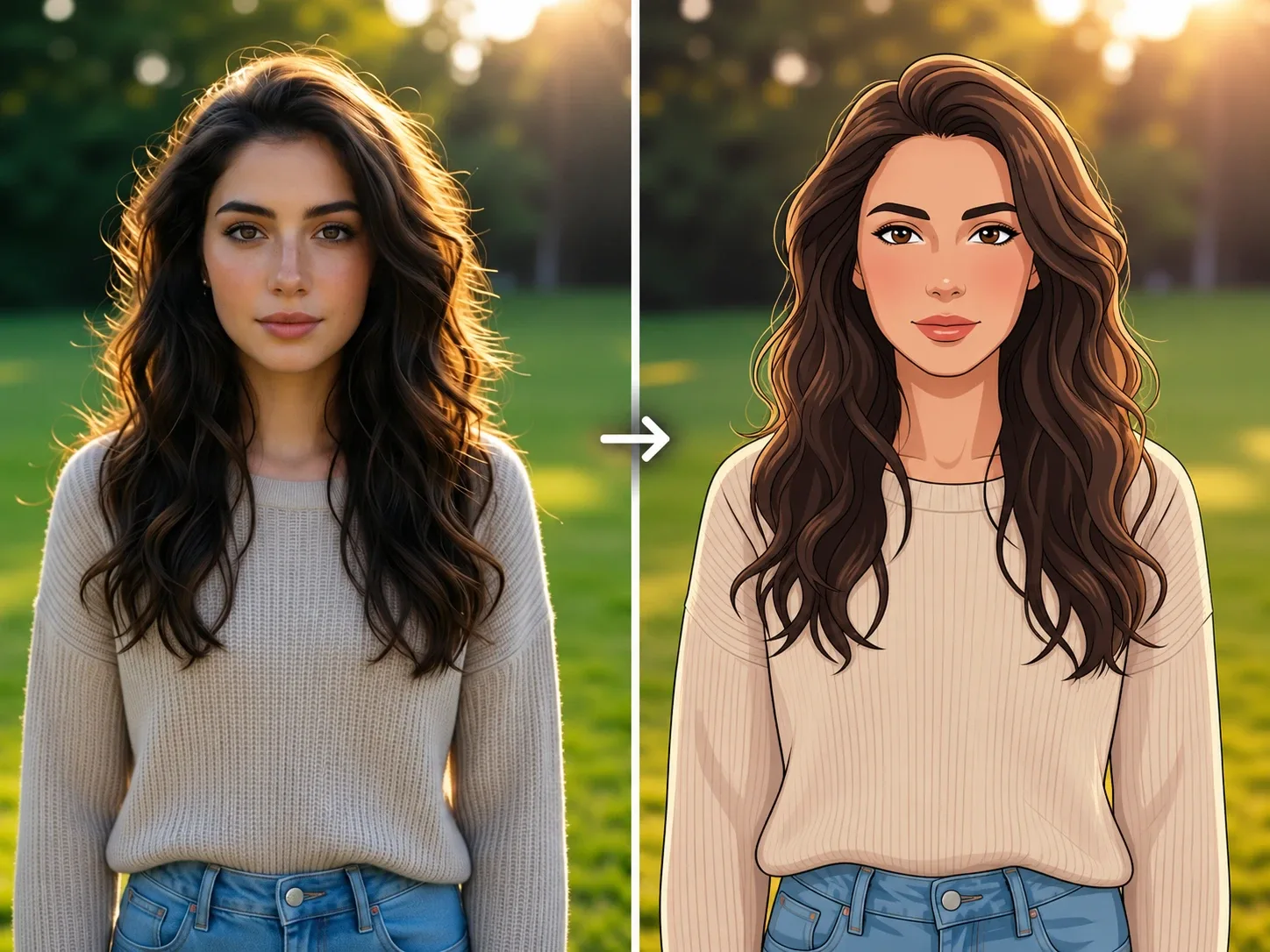
3. 1つのビジュアル要素ずつ微調整する
キャラクターが合っているのに背景がごちゃごちゃしているなら、背景だけを変更してください。背景は良いのに顔が無個性に見えるなら、元画像に戻って“アイデンティティを強める指示”を追加しましょう。
アニメ写真のプロンプト10選
| Use Case | Prompt |
|---|---|
| Anime portrait | Transform this portrait into a polished anime-style illustration. Preserve the person’s face shape, hairstyle, skin tone, expression, clothing, pose, and framing. Use clean line art, soft cel shading, and a warm evening palette. |
| School-life scene | Turn this photo into a bright anime school-life scene. Preserve the person’s identity, hairstyle, clothing, expression, pose, and background layout. Use clean outlines, soft daylight, and gentle color shading. |
| Cinematic city scene | Transform this city portrait into a cinematic anime illustration. Preserve the person’s face, clothing, pose, street layout, and camera angle. Use detailed line art, glowing evening lights, and controlled blue-and-amber color contrast. |
| Fantasy landscape | Turn this travel photo into an anime-inspired fantasy landscape. Preserve the people, landmark, horizon, composition, and camera framing. Use detailed clouds, rich natural colors, and clean illustrated textures. |
| Pet portrait | Transform this pet photo into a charming anime-style illustration. Preserve the animal’s breed, fur markings, collar, pose, expression, and background composition. Use expressive line art and soft cel shading. |
| Couple illustration | Turn this couple photo into a warm anime-style scene. Preserve both people’s recognizable faces, hairstyles, clothing, expressions, poses, and spacing. Use soft sunset light and a simple illustrated background. |
| Retro anime | Transform this photo into a retro anime-style illustration with simplified shapes, a limited color palette, subtle grain, and classic cel shading. Preserve the subject, pose, clothing, and composition. |
| Chibi character | Turn the person in this photo into a chibi anime character with a larger head and simplified body. Preserve the hairstyle, clothing colors, accessories, expression, and pose. Use clean lines and soft pastel colors. |
| Anime profile image | Create an anime-style profile portrait from this photo. Preserve the face shape, hairstyle, skin tone, glasses, expression, and clothing. Use a clean head-and-shoulders crop, refined line art, and a simple gradient background. |
| Group photo | Transform this group photo into an anime-style illustration. Preserve the exact number of people, their faces, hairstyles, clothing, poses, spacing, and background layout. Use consistent line art and balanced cel shading across all characters. |
複数の画像にわたってアイデンティティを保つ
複数のシーンで同じアニメキャラクターにしたいときは、安定して維持されるべき特徴を定義します。
- 顔の形
- 目の色と形
- 髪型と髪の色
- 肌の色
- 肩に着る服の色
- アクセサリー
- 体の比率
- イラストのスタイル
繰り返し使えるワークフローなら、一貫したAIキャラクターの作り方を読んでください。
また、ビジュアル参照も使えます。
“画像1をアイデンティティと構図の参照として使ってください。画像2は、線画、カラーパレット、陰影スタイルのガイドとしてのみ使ってください。画像1の人物、ポーズ、服、背景のレイアウトを保ってください。画像2からキャラクターや物をそのままコピーしないでください。”
よくある問題と解決策
| Problem | Prompt Adjustment |
|---|---|
| 顔が無個性に見える | 保護したい要素として、顔の構造、髪型、肌の色、表情、メガネ、そして見える特徴を名前で指定してください。 |
| 髪型が変わる | 生え際、長さ、分け目、色、質感を保ってください。 |
| 服が差し替わる | 元の服、色、アクセサリーは残す必要があると明記してください。 |
| リアル感が残りすぎる | クリアな線画、セル塗り、簡略化した形、イラスト風の質感を求めてください。 |
| スタイルが極端になりすぎる | 現実的なプロポーションと、控えめなデフォルメを指定しましょう。 |
| 集団で人が減る | 人の正確な人数を指定し、それぞれの位置を保ってください。 |
| 背景が大きく変わる | 元の構図、建物、ランドマーク、カメラアングルを守ってください。 |
より広い“カートゥーン”テイストならAIで写真をカートゥーンに変えるをご覧ください。さらに詳しいキャラクターデザインのワークフローは、AIキャラクター画像ジェネレーターをご利用ください。
元の画像をそのまま保ち、完成したアニメ版を見比べて、改善が必要な部分だけを微調整しましょう。