Turning a day photo into night means changing more than the sky. The buildings, ground, windows, water, clothing, shadows, and visible light sources all need to fit the new time of day.
A strong AI edit preserves the original place and composition while rebuilding the scene’s lighting as a coherent nighttime environment.
Decide What Kind of Night You Need
“Night” can mean very different things. Choose the atmosphere before writing the prompt.
| Scene Type | Lighting Direction |
|---|---|
| Blue hour | Cool ambient light with detail still visible |
| Moonlit night | Soft blue-gray light and gentle shadows |
| City night | Street lamps, lit windows, signs, and reflections |
| Warm evening | Low natural light with indoor or exterior lamps |
| Rainy night | Wet surfaces, reflections, and restrained light sources |
| Cinematic night | Stronger contrast and controlled color mood |
Start with blue hour or a softly lit evening if you want to preserve more of the original detail.
How to Turn a Day Photo Into Night
1. Protect the Original Scene
Upload your photo to the AI Image Editor.
Identify the details that should remain stable:
- People and faces
- Buildings and road layout
- Trees and landscape
- Product shape and colors
- Camera angle and crop
- Major objects
- Existing signs and text
2. Describe the Complete Lighting Change
A useful prompt should include the sky, ambient light, practical light sources, shadows, and reflections.
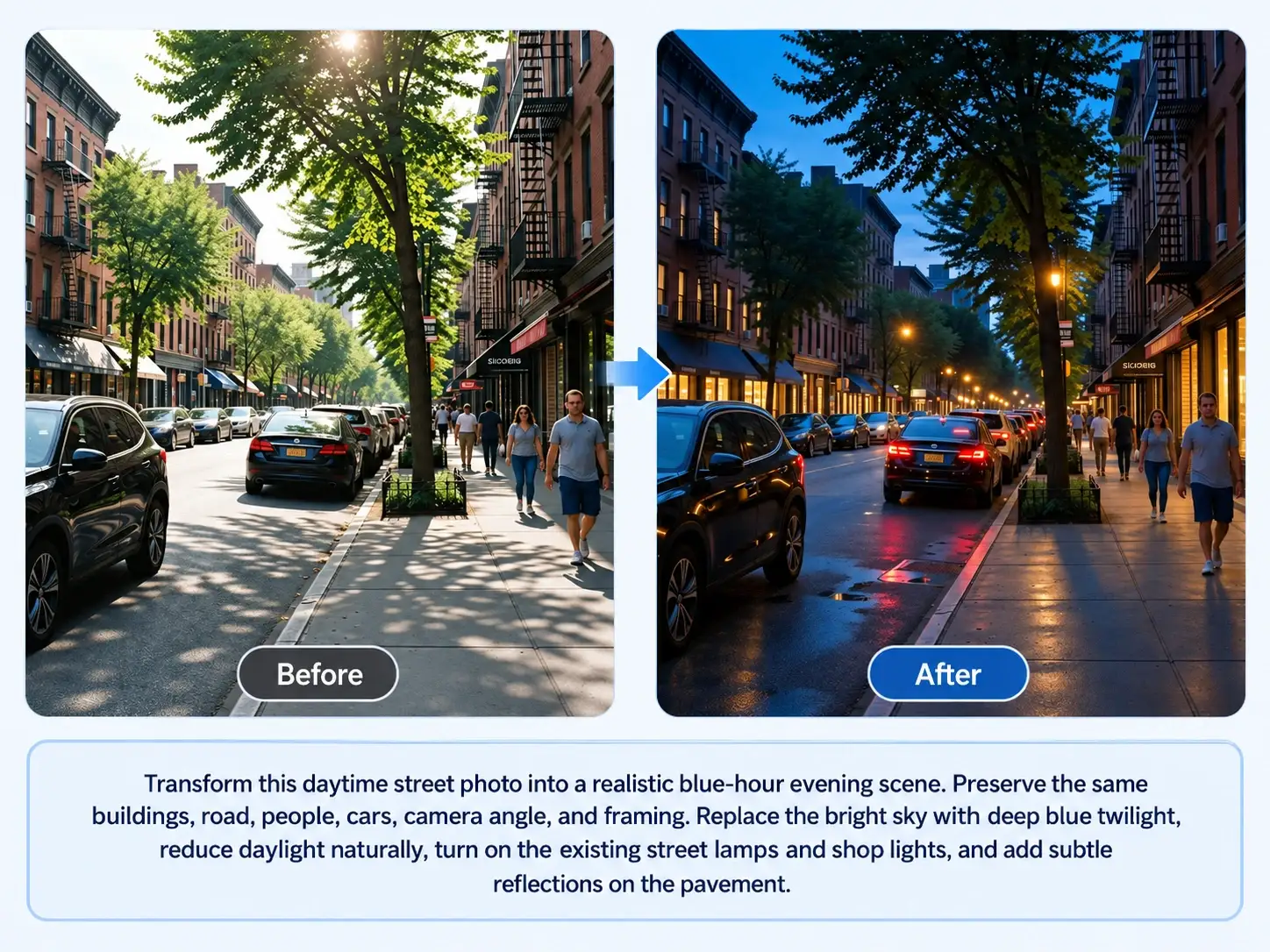
“Transform this daytime street photo into a realistic blue-hour evening scene. Preserve the same buildings, road, people, cars, camera angle, and framing. Replace the bright sky with deep blue twilight, reduce daylight naturally, turn on the existing street lamps and shop lights, and add subtle reflections on the pavement.”
3. Review Every Light Source
Check whether the result has a believable lighting system.
Look for:
- Lit windows or lamps without visible spill
- Strong shadows with no light source
- Bright midday reflections left on dark surfaces
- Cars, signs, or windows changing shape
- Faces becoming unrecognizable
- An overly black background with lost scene detail
If one element looks wrong, edit that light source directly instead of rewriting the whole scene.
10 Day-to-Night AI Prompts
| Scene | Prompt |
|---|---|
| Blue-hour street | Transform this daytime street photo into a realistic blue-hour evening scene. Preserve the buildings, road, people, vehicles, composition, and camera angle. Use deep blue sky tones, reduced daylight, lit street lamps, and subtle reflections on the pavement. |
| City night | Turn this daytime city image into a realistic nighttime scene. Preserve the skyline, streets, buildings, people, cars, and framing. Add a dark blue sky, illuminated windows, existing street lights, and restrained reflections without changing the architecture. |
| Moonlit landscape | Transform this daytime landscape into a calm moonlit night. Preserve the mountains, trees, lake, horizon, camera angle, and composition. Use a dark blue sky, soft moonlight, subtle water reflections, and enough detail to keep the landscape visible. |
| Evening portrait | Turn this daytime portrait into a natural early-evening image. Preserve the person’s face, hairstyle, expression, clothing, body proportions, pose, and background. Use soft blue ambient light and gentle warm light from nearby windows or lamps. |
| Rainy city night | Transform this daytime street scene into a rainy night. Preserve the original buildings, street layout, people, cars, and perspective. Add wet pavement, restrained reflections, dark blue evening light, and existing street lamps. |
| Restaurant exterior | Turn this daytime restaurant exterior into a warm nighttime scene. Preserve the building, entrance, signs, tables, people, and camera angle. Add soft warm interior light through windows, subtle exterior lamps, and realistic evening shadows. |
| Beach at night | Transform this daytime beach photo into a calm night scene. Preserve the shoreline, waves, sand, people, horizon, and composition. Use deep blue moonlight, subtle reflections on the water, and natural low-light detail. |
| Garden evening | Turn this daytime garden into a warm evening setting. Preserve the plants, paths, furniture, house, and camera framing. Replace daylight with soft dusk light and add warm illumination from existing garden lamps or windows. |
| Product scene | Transform this daytime product photo into an evening campaign image. Preserve the product’s exact shape, color, label, logo, position, and proportions. Use a darker setting with one soft practical light source and realistic contact shadows. |
| Interior at night | Turn this daylight interior into a realistic nighttime room scene. Preserve the furniture, walls, windows, layout, and camera angle. Darken the exterior view, add warm light from existing lamps, and maintain believable shadows and reflections. |
Preserve People in Low Light
Day-to-night editing can change faces and clothing because the image must be relit.
Add a preservation instruction:
“Keep the person’s exact face, hairstyle, skin tone, expression, clothing, body proportions, hands, and pose unchanged. Change only the time of day, sky, ambient light, practical lighting, shadows, and reflections.”
If the subject is the main focus, use a modest evening setting instead of a nearly black scene. It is easier to keep the person recognizable.
Day-to-Night vs. Sky Replacement
Use day-to-night editing when the whole scene should feel like a new time of day.
Use AI Sky Replacement when the foreground lighting already works and only the sky needs to change.
For a wider change of setting, see How to Change Photo Background.
Common Problems and Fixes
| Problem | Prompt Adjustment |
|---|---|
| The scene is too dark | Request blue-hour or softly lit evening rather than deep night. |
| Windows glow without lighting the room | Ask for subtle warm spill from visible lamps or windows. |
| The subject’s face changes | Preserve facial identity, expression, skin tone, hairstyle, and pose. |
| The original sun shadows remain | Request natural low-light shadows that match the new illumination. |
| Buildings change shape | Explicitly protect architecture, layout, perspective, and framing. |
| Reflections are too bright | Request restrained reflections that match the light sources. |
| New lamps appear everywhere | Name the existing lamps or ask for minimal practical lighting. |
Check the Final Scene
A realistic night edit has a consistent answer to three questions:
- Where does the light come from?
- Which surfaces should reflect it?
- Which details should still be visible?
Keep the original image and compare it with the final version before publishing. Check faces, architecture, text, product details, and the direction of every visible light source.
Use the AI Image Editor to test a soft blue-hour version first, then refine the scene toward darker night if needed.