A casual photo can become a professional portrait without changing the person, pose, or background. AI can replace a T-shirt, hoodie, jeans, or casual dress with a suit, blazer, formal shirt, evening dress, or other event-ready outfit.
The main challenge is controlling the clothing edit. A vague prompt may change the face, body shape, hands, lighting, or background along with the clothes.
What Makes a Formal Outfit Look Realistic?
A formal outfit prompt should describe:
- Garment type
- Fit and silhouette
- Fabric
- Color
- Collar, lapel, buttons, or neckline
- Accessories
- Occasion
- Details that must remain unchanged
For example, “make this formal” is too broad. A more useful instruction is:
“Replace the casual T-shirt with a tailored navy blazer over a crisp white shirt. Preserve the person’s face, hairstyle, expression, body proportions, hands, pose, background, lighting, and camera framing.”
How to Change Casual Clothes Into Formal Wear
1. Upload a Clear Photo
Open XPT and upload a photo where the current outfit is visible.
A useful source image should show:
- The shoulders and upper body
- The current clothing shape
- The person’s hands
- A clear face
- Even lighting
- Enough space around the body
Full-body photos work better when you want to preview trousers, skirts, shoes, or a complete formal outfit.
2. Describe the Formal Outfit
Name the exact outfit instead of using general words such as “professional” or “elegant.”
For example:
“Change the casual outfit into a formal white dress shirt. Keep the hairstyle, facial features, expression, and overall appearance unchanged. Maintain the original pose and image style.”
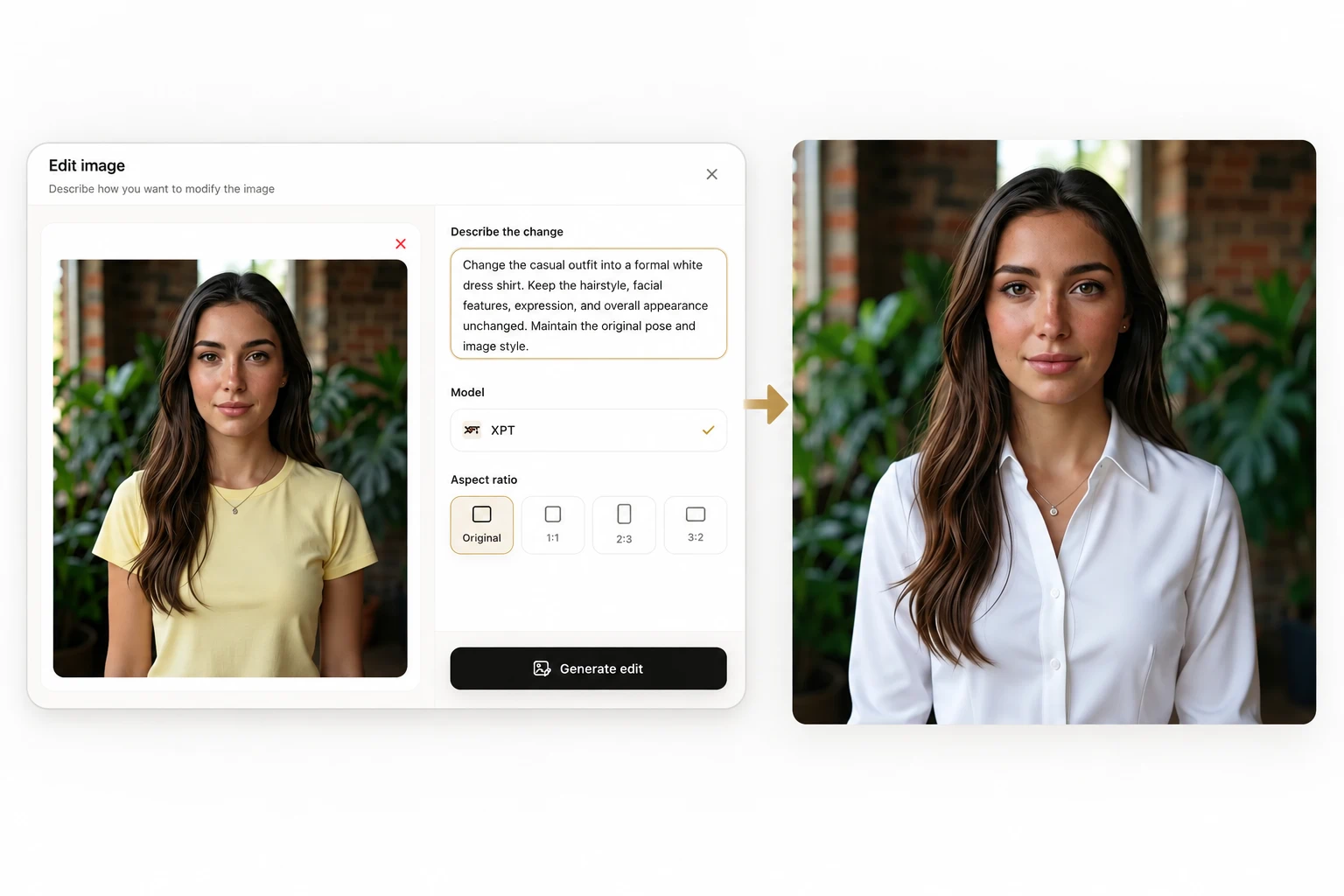
“Change only the clothing. Keep the face, hair, skin tone, expression, body proportions, hands, pose, background, lighting, and camera angle unchanged.”
If you need a specific garment reference, see how to edit an image with a reference image.
3. Review the Outfit and Identity
Compare the result with the original photo.
Check:
- Face and expression
- Shoulder width and body proportions
- Collar and neckline
- Sleeve and hand edges
- Buttons, zippers, and lapels
- Fabric folds
- Shadows around the clothes
- Background and lighting
If the outfit is correct but one detail is wrong, make a small follow-up edit rather than rewriting the entire prompt.
10 AI Prompts for Casual-to-Formal Outfit Changes
| Use Case | Prompt |
|---|---|
| Business suit | Replace the casual outfit with a tailored navy business suit, crisp white dress shirt, and subtle dark tie. Preserve the person’s face, hairstyle, expression, body proportions, hands, pose, background, lighting, and camera framing. |
| Interview outfit | Change the casual T-shirt and jeans into a professional charcoal blazer, pale blue shirt, tailored black trousers, and simple leather shoes. Keep the person’s identity, pose, hands, body shape, background, and lighting unchanged. |
| Smart casual office look | Replace the casual clothes with a structured beige blazer, white blouse, straight-leg dark trousers, and simple loafers. Use a polished but approachable style. Preserve the face, hairstyle, expression, body proportions, pose, and background. |
| Women’s formal suit | Change the casual outfit into a fitted navy pantsuit with a light silk blouse and minimal jewelry. Keep the person’s exact face, hairstyle, skin tone, expression, hands, pose, body proportions, and original lighting. |
| Formal dress | Replace the casual outfit with a knee-length black sheath dress with a simple neckline and tailored fit. Preserve the person’s identity, body proportions, pose, hands, hairstyle, expression, background, and camera angle. |
| Evening event | Transform the casual outfit into an elegant floor-length emerald evening dress with a refined silhouette and minimal accessories. Keep the person’s face, hair, expression, body shape, pose, hands, background, and lighting unchanged. |
| Wedding guest look | Replace the casual clothing with a sophisticated midi dress in deep blue, low-contrast jewelry, and elegant closed-toe shoes. Keep the person recognizable and preserve the original pose, expression, body proportions, background, and lighting. |
| Formal menswear | Replace the casual hoodie with a fitted charcoal blazer, white Oxford shirt, tailored trousers, and brown leather dress shoes. Preserve the person’s face, hair, expression, body proportions, hands, pose, camera angle, background, and lighting. |
| Conference portrait | Change the casual clothes into a polished dark blazer, light neutral shirt, tailored trousers, and understated watch. Use a professional editorial appearance while keeping the original person and scene unchanged. |
| Black-tie outfit | Replace the casual outfit with a classic black tuxedo, white formal shirt, black bow tie, and polished dress shoes. Preserve the person’s exact identity, face, hairstyle, pose, hands, body proportions, lighting, and background. |
Match the Outfit to the Occasion
Formal wear is different for every setting.
| Occasion | Suitable Direction |
|---|---|
| Job interview | Structured blazer, neutral shirt, tailored trousers |
| Office portrait | Blazer, blouse or Oxford shirt, minimal accessories |
| Business conference | Professional suit or smart separates |
| Wedding guest | Refined dress or coordinated suit |
| Evening event | Dark suit, tuxedo, or elegant evening dress |
| Formal ceremony | Conservative silhouette, polished shoes, restrained accessories |
| Corporate website | Clean colors, simple tailoring, uncluttered appearance |
Include the occasion in the prompt when you want the AI to choose appropriate styling details.
Preserve the Face and Body
Changing clothing often affects the shoulders, neck, arms, and hands. Add a strict preservation instruction:
“Do not change the person’s facial features, age, skin tone, hairstyle, expression, body proportions, hands, or pose. Edit only the clothing, shoes, and requested accessories.”
Avoid asking the AI to make the person “slimmer,” “younger,” or “more attractive” in the same prompt. Those instructions can create identity drift and make the clothing preview less useful.
Use a Clothing Reference Image
If you want a specific suit, dress, blazer, or shirt, upload it as a second image.
Use a prompt such as:
“Use Image 1 as the person reference and Image 2 as the clothing reference. Apply the formal outfit from Image 2 to the person in Image 1. Preserve the person’s exact face, hairstyle, skin tone, body proportions, pose, hands, background, lighting, and camera angle. Do not copy the model’s face or body from Image 2.”
For more general clothing edits, see how to change clothes in a photo with AI prompts.
Common Problems and Fixes
| Problem | Prompt Adjustment |
|---|---|
| Face changes | State that facial identity, age, expression, and hairstyle must remain unchanged |
| Body shape changes | Preserve the original body proportions and pose |
| Hands look distorted | Ask to keep the original hand position and natural anatomy |
| Outfit looks painted on | Describe realistic fabric, seams, folds, shadows, and fit |
| Collar or lapel looks wrong | Name the exact collar, neckline, lapel, and closure |
| Accessories multiply | Specify which accessories to keep, remove, or add |
| Background changes | State that only the clothing may be edited |
| Outfit looks too casual | Add the occasion, tailoring, fabric, and desired level of formality |
Review the Result Before Using It
AI outfit previews are useful for exploring formal styling, but inspect the image before using it for a profile, application, invitation, or professional page.
Confirm that:
- The person still looks like the original.
- The clothing is appropriate for the intended setting.
- The neckline, sleeves, and fit look natural.
- Hands and accessories are correct.
- The background and lighting still match.
- Logos, buttons, and text are not distorted.
Upload your photo to XPT, describe the formal outfit in detail, and tell the AI exactly what must remain unchanged.