An anime-style edit can turn a portrait, pet photo, travel image, or everyday scene into a stylized illustration. The strongest result keeps the subject recognizable while changing the line art, color palette, shading, and atmosphere.
Start with a clear source image and decide what should stay the same: face, hairstyle, clothes, pose, background, or composition.
Choose an Anime Direction
Anime can range from quiet watercolor-like scenes to bold action art. Define the visual direction before you generate.
| Direction | Visual Cues |
|---|---|
| Soft slice-of-life | Gentle light, clean lines, warm colors |
| Cinematic fantasy | Dramatic sky, detailed scenery, rich color |
| Modern action | Strong line work, sharper contrast, dynamic framing |
| School-life illustration | Bright daylight, clean colors, casual settings |
| Retro anime | Limited palette, grain, simplified shadows |
| Chibi | Larger head, simplified body, expressive features |
Avoid relying on a named living artist. Describe the visual elements you want instead.
Turn a Photo Into Anime With AI
1. Upload a Clear Source Image
Use XPT and choose a photo with a clear subject and visible details.
For portraits, make sure the face, hairline, clothing, and expression are easy to see.
2. Preserve the Subject Before Styling It
Start your prompt with the subject’s identity and composition requirements:
“Transform this portrait into a polished anime-style illustration. Preserve the person’s face shape, hairstyle, skin tone, expression, clothing, pose, and framing. Use clean line art, soft cel shading, and a warm evening color palette.”
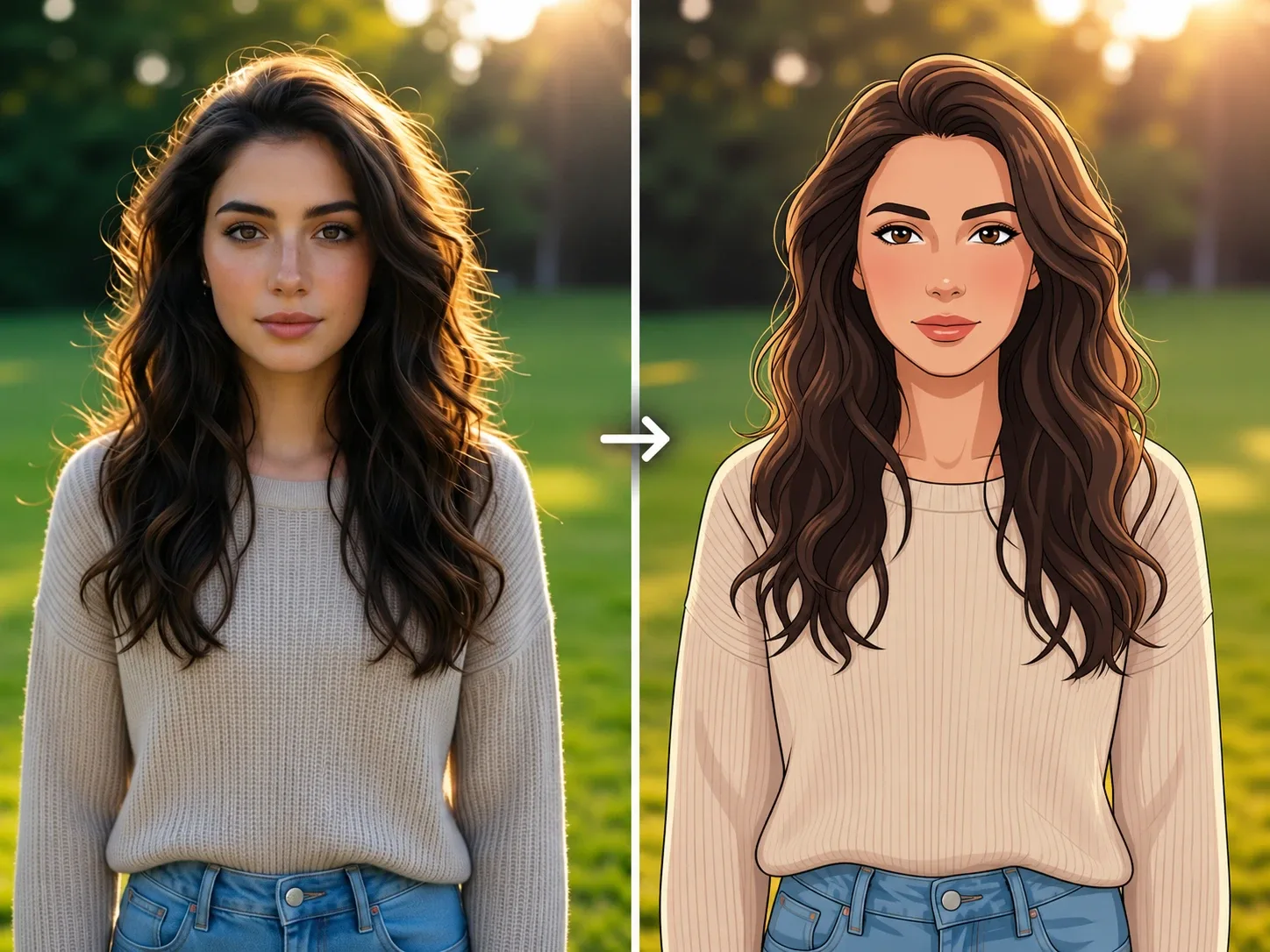
3. Refine One Visual Element at a Time
If the character looks right but the background is too busy, change the background only. If the background is good but the face looks generic, return to the original and strengthen the identity instructions.
10 Anime Photo Prompts
| Use Case | Prompt |
|---|---|
| Anime portrait | Transform this portrait into a polished anime-style illustration. Preserve the person’s face shape, hairstyle, skin tone, expression, clothing, pose, and framing. Use clean line art, soft cel shading, and a warm evening palette. |
| School-life scene | Turn this photo into a bright anime school-life scene. Preserve the person’s identity, hairstyle, clothing, expression, pose, and background layout. Use clean outlines, soft daylight, and gentle color shading. |
| Cinematic city scene | Transform this city portrait into a cinematic anime illustration. Preserve the person’s face, clothing, pose, street layout, and camera angle. Use detailed line art, glowing evening lights, and controlled blue-and-amber color contrast. |
| Fantasy landscape | Turn this travel photo into an anime-inspired fantasy landscape. Preserve the people, landmark, horizon, composition, and camera framing. Use detailed clouds, rich natural colors, and clean illustrated textures. |
| Pet portrait | Transform this pet photo into a charming anime-style illustration. Preserve the animal’s breed, fur markings, collar, pose, expression, and background composition. Use expressive line art and soft cel shading. |
| Couple illustration | Turn this couple photo into a warm anime-style scene. Preserve both people’s recognizable faces, hairstyles, clothing, expressions, poses, and spacing. Use soft sunset light and a simple illustrated background. |
| Retro anime | Transform this photo into a retro anime-style illustration with simplified shapes, a limited color palette, subtle grain, and classic cel shading. Preserve the subject, pose, clothing, and composition. |
| Chibi character | Turn the person in this photo into a chibi anime character with a larger head and simplified body. Preserve the hairstyle, clothing colors, accessories, expression, and pose. Use clean lines and soft pastel colors. |
| Anime profile image | Create an anime-style profile portrait from this photo. Preserve the face shape, hairstyle, skin tone, glasses, expression, and clothing. Use a clean head-and-shoulders crop, refined line art, and a simple gradient background. |
| Group photo | Transform this group photo into an anime-style illustration. Preserve the exact number of people, their faces, hairstyles, clothing, poses, spacing, and background layout. Use consistent line art and balanced cel shading across all characters. |
Preserve Identity Across Multiple Images
When you want the same anime character in several scenes, define the features that should remain stable:
- Face shape
- Eye color and shape
- Hairstyle and hair color
- Skin tone
- Outfit colors
- Accessories
- Body proportions
- Illustration style
For a repeatable workflow, read How to Create Consistent AI Characters.
You can also use a visual reference:
“Use Image 1 as the identity and composition reference. Use Image 2 only as a guide for the line art, color palette, and shading style. Preserve Image 1’s person, pose, clothing, and background layout. Do not copy characters or objects from Image 2.”
Common Problems and Fixes
| Problem | Prompt Adjustment |
|---|---|
| The face looks generic | Name facial structure, hairstyle, skin tone, expression, glasses, and visible features to preserve. |
| The hairstyle changes | Preserve the hairline, length, parting, color, and texture. |
| Clothing is replaced | State that the original outfit, colors, and accessories must remain. |
| Too much realism remains | Request clear line art, cel shading, simplified shapes, and illustrated textures. |
| The style becomes too extreme | Ask for realistic proportions and moderate stylization. |
| A group loses people | State the exact number of people and preserve their positions. |
| Background changes too much | Protect the original composition, architecture, landmarks, and camera angle. |
For a broader cartoon treatment, see Turn Photo Into Cartoon With AI. For a more detailed character design workflow, use the AI Character Image Generator.
Keep the original image, compare the final anime version against it, and refine only the part that needs improvement.