Swap a coffee cup for a vase, preview a different chair, or change a prop in a campaign photo. To replace objects in photos with AI, identify the original object, describe its replacement, and specify what the surrounding scene should retain.
The replacement needs more than the right appearance. Its size, position, shadows, and relationship with nearby objects determine whether it belongs in the photograph.
How to Replace an Object in a Photo
1. Identify Exactly What Should Change
Start with the original photo and name the object by its appearance and location: “the red mug beside the laptop” is clearer than “the cup.”
If your editor provides selection controls, select the target area. Adobe’s Generative Fill documentation, for example, describes brushing over an area before generating a replacement.
For a prompt-based edit, make the location explicit in your instructions.
2. Describe the Replacement in Context
Prepare your photo for the AI Image Editor and use a focused instruction:
“Replace the red mug beside the laptop with a small matte-white ceramic vase containing three green stems. Place the vase on the same part of the desk and keep it approximately the same height as the mug. Match the existing window light and contact shadow. Preserve the laptop, desk, chair, background, and original framing.”
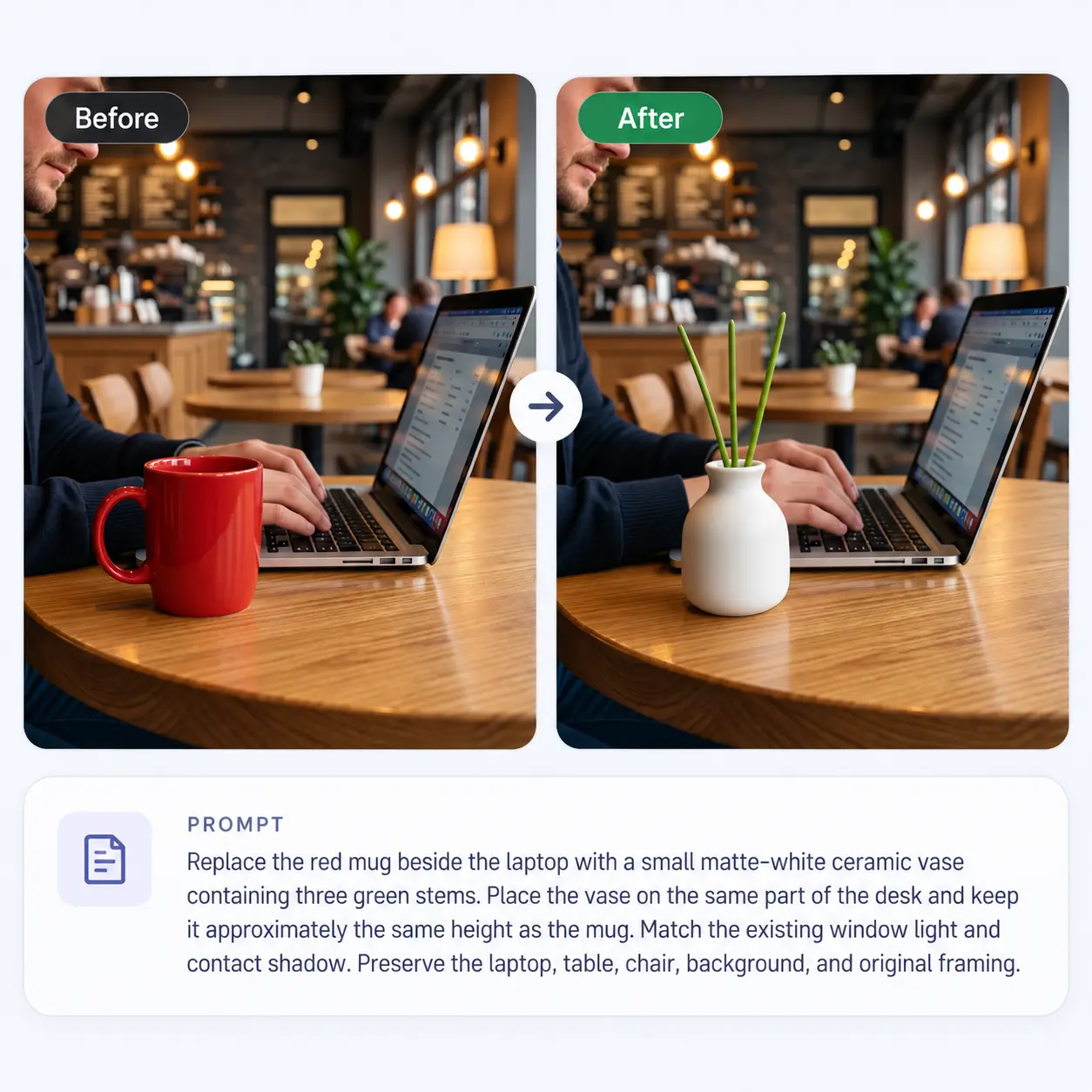
3. Check Where the Objects Meet
Look closely at the replacement’s contact with a table, floor, hand, or nearby object. Check for floating edges, leftover parts of the original, duplicated objects, and mismatched shadows.
Refine a specific problem:
“Keep the new vase and the rest of the photo unchanged. Replace the green stems in the vase with a small bouquet of white lilies. Preserve the laptop, desk, chair, background, and original framing.”
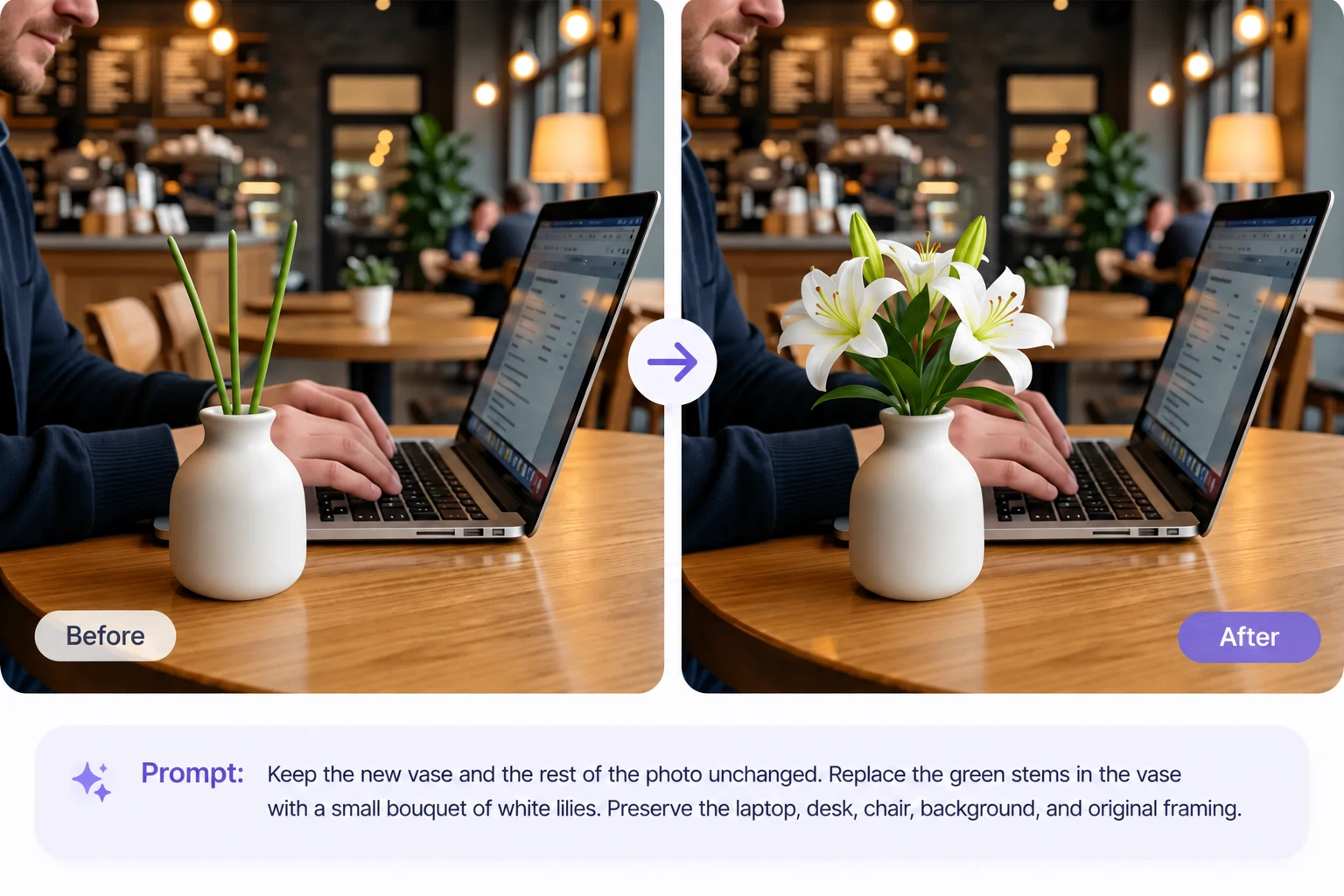
10 Object Replacement Prompts
| Use Case | Prompt |
|---|---|
| Mug to vase | Replace the red mug on the desk with a small matte-white ceramic vase holding three green stems. Keep the vase at the same location and approximately the same height. Match the window light, tabletop perspective, and contact shadow. Preserve all other objects and the framing. |
| Dining chair | Replace only the black chair nearest the camera with a light-oak dining chair with a woven seat. Match its seat height, orientation, and position beside the table. Keep the table, other chairs, room, and lighting unchanged. Ensure all four legs meet the floor naturally. |
| Table lamp | Replace the metal lamp on the bedside table with a cream ceramic lamp and a plain linen shade. Keep a similar overall height and base position. Show the lamp switched off, matching the existing daylight. Preserve the books, table, wall, and camera angle. |
| Sofa | Replace the gray sofa against the back wall with a warm-beige three-seat sofa with rounded arms. Keep a similar footprint and the same orientation. Preserve the rug, coffee table, windows, and room structure. Match the existing shadows and perspective. |
| Wall art | Replace the framed poster above the sofa with an abstract painting in muted blue and sand tones. Retain the frame’s outer dimensions, position, angle, and wall shadow. Preserve the surrounding wall, furniture, and lighting. Do not add text. |
| Flower arrangement | Replace the red roses in the glass vase with white tulips of similar overall height. Keep the original vase, water level, table, and background. Show the stems naturally through the glass and preserve nearby reflections. |
| Food styling | Replace the sandwich on the white plate with one croissant. Keep the plate, cutlery, drink, and table unchanged. Match the original camera angle, focus, and light direction. Reconstruct the plate surface exposed by the smaller pastry without adding garnish. |
| Handheld accessory | Replace the closed notebook held in the person’s left hand with a plain brown leather folio of similar dimensions and thickness. Preserve the face, outfit, pose, fingers, and grip. Keep the correct overlap between the fingers and the new object. |
| Gift presentation | Replace the cardboard box on the table with a cream gift box of the same size, tied with a narrow dark-green ribbon. Keep its position and perspective. Match the original light and shadow, preserve the surrounding props, and add no text or branding. |
| Seasonal decor | Replace the pumpkin beside the front door with a terracotta pot containing a small flowering plant. Keep the replacement within a similar footprint. Preserve the door, steps, wall, and framing. Remove the pumpkin’s shadow and create one appropriate for the plant and pot. |
Use a Reference for a Specific Replacement
Text can describe a general object, but a reference is more useful when you need a particular design. Clearly separate the scene image from the object reference:
“Use Image 1 as the scene and Image 2 as the chair reference. Replace only the chair beside the window in Image 1 with the chair shown in Image 2. Preserve its visible design, upholstery, color, and leg shape. Adapt its orientation and lighting to Image 1 while keeping the room and other furniture unchanged.”
Choose a reference that shows the surfaces needed in the final view. A front-facing product photo cannot establish every detail of its back or sides.
See how to edit images with a reference image for more guidance.
Fix the Details That Make a Swap Look Artificial
| Problem | What to Adjust |
|---|---|
| Both objects appear | Specify “replace,” identify the original precisely, and request removal of its remaining parts. |
| The replacement floats | Describe its contact with the surface and request a matching contact shadow. |
| The size feels wrong | Compare its height or width with a visible nearby object. |
| A hand changes | Use a replacement that fits the existing grip and explicitly protect the fingers and pose. |
| The old shadow remains | Request removal of the original object’s shadow and creation of a shadow for the replacement. |
| The new object is smaller | Ask to reconstruct the newly exposed surface using surrounding texture and perspective. |
| Branding becomes inaccurate | Compare against the original asset; use manual compositing when exact lettering or logo geometry is essential. |
Preservation instructions communicate your goal, but they do not guarantee an exact match. Check the complete image as well as the edited area.
For broader room changes, explore AI room design from a photo. If the object should stay and the setting should change, use the workflow for changing a photo background.
Start with one clearly visible object, choose a replacement that fits the scene, and review the result before moving to the next edit.